GIT Branching strategies


What are GIT branching strategies?

GIT branching strategies are patterns or approaches that tech teams use to organize & manage their code through different branches in a GIT system.

Each strategy defines the rules & guidelines for the creation, naming & merging the branches for facilitating collaboration, stability, & release management.

In this article, we're going to discuss  git branching strategy best use cases, hands-on on git, as well as the git branching strategies we follow. Along with recommendations on how to use git to accomplish work in a consistent and productive manner.

GIT

What are the different GIT branching strategies?

Here are some commonly used git branching strategies:


Master branch

This is the main branch and one of the repository in which we have the latest stable code of production.  

General rules:

- Access to direct merge is restricted

- Best practice is to create a CI/CD pipeline to merge code into this branch after deployment is done in Production

- It should always have the latest stable version of production server

- Allow access to only CD tools like Jenkins to make commits to this branch

The master branch should never have unreleased code, i.e., commits made but not yet released.


Integration branch

This is the most important and active branch of the repository from which we make releases to the production server.

General rules:

- Access to direct merge is restricted

- Code is merged into this branch when it becomes eligible for production deployment

- Code in this branch should always be in a deployable state to production

- QA tested code should be into this branch using CI/CD tools

Ideally, the Integration branch should also never have unreleased code, some time on the deployment day when the code is merged a few hours before deployment time.


Staging branch

This is another stable branch of the repository for QA-environment from which we make releases to the QA server.

General rules:

-Access is restricted

-Changes can be submitted only through Pull Requests. No direct commits are allowed

-Should always have the latest stable/released version of QA release server

-It is absolutely necessary to ensure only dev tested and reviewed code gets merged into this branch

Prior to production deployment, all the feature changes must get merged in staging and validated on QA. Once validation is completed, we'll raise another MR towards the integration branch.


Dev-deploy branch

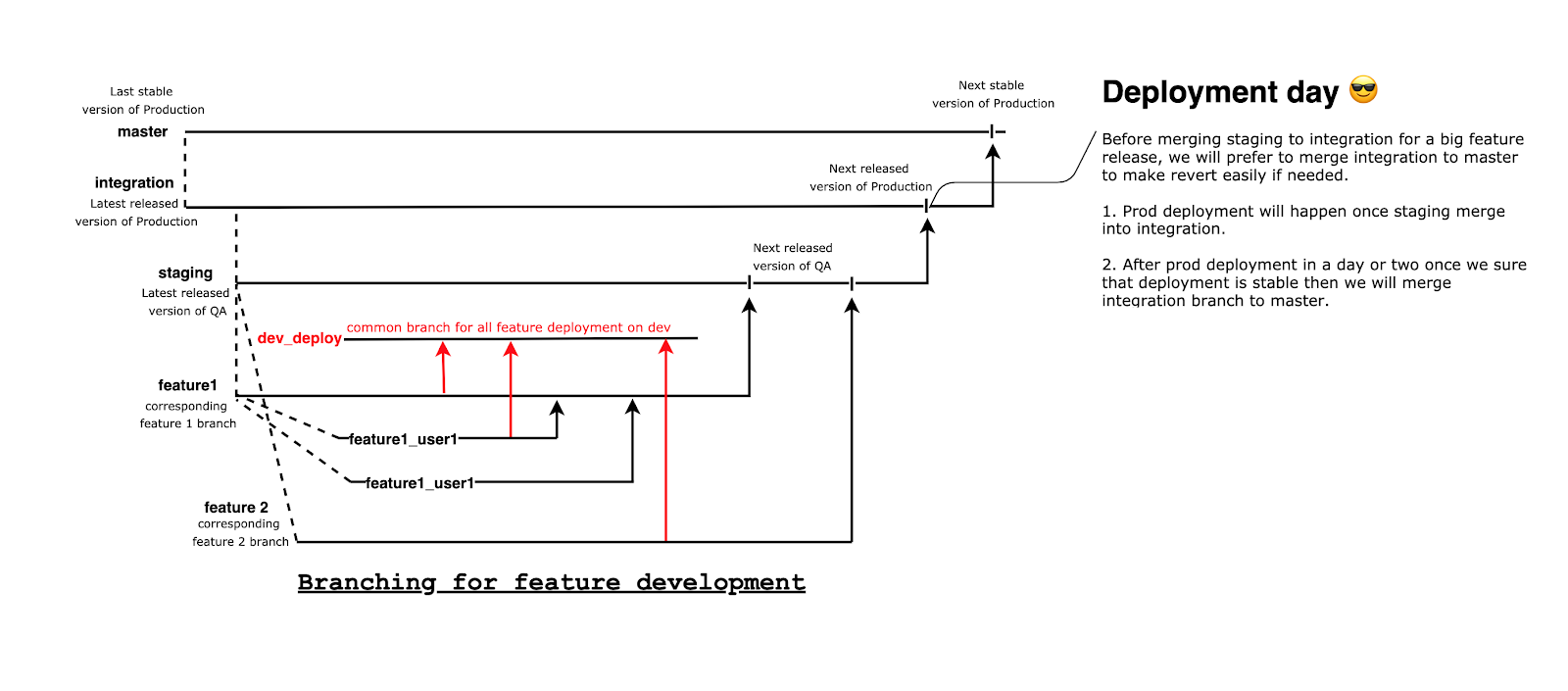
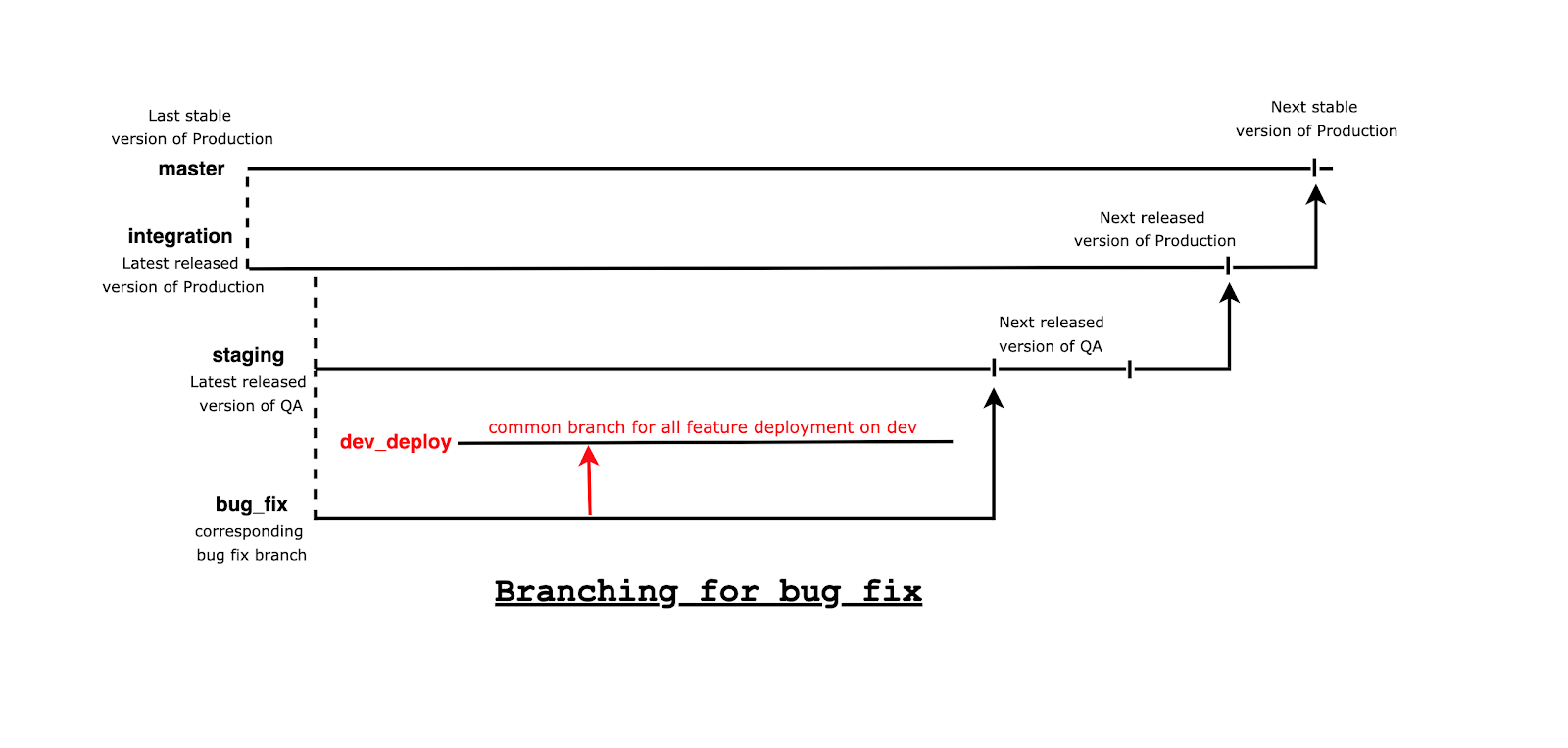
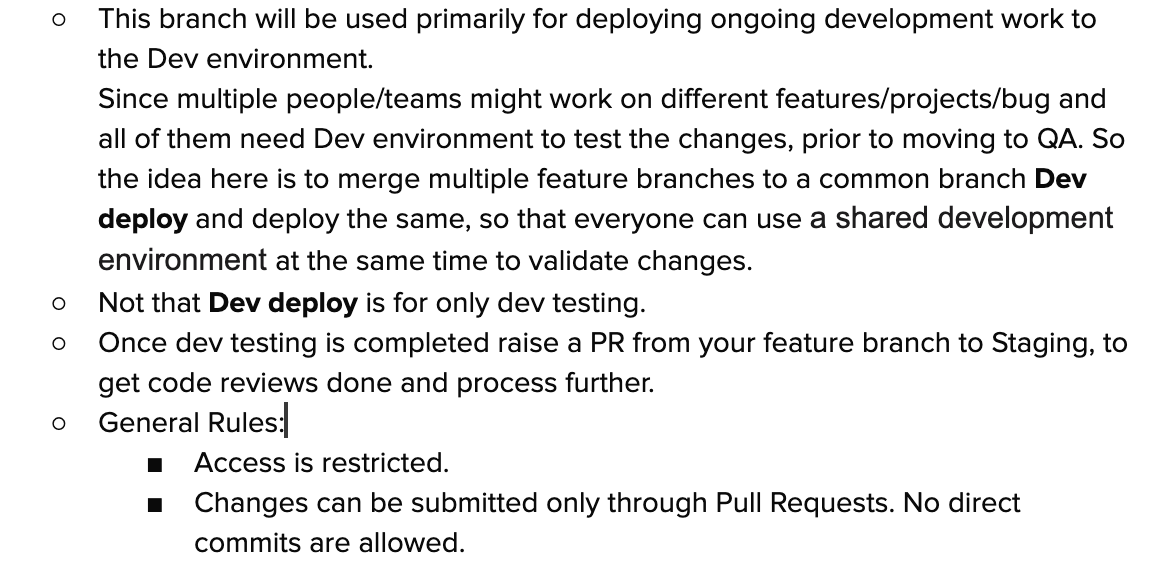
This branch will be used primarily for deploying on-going development work to the Dev environment. Since multiple teams may work on different features, projects and bugs at the same time, all of them need a Dev environment to test the changes before moving to QA. The idea of the Dev-deploy branch is to merge multiple feature branches to a common branch and deploy the same.

This is so that everyone can use a shared development environment at the same time to validate changes.
Dev-deploy-strategy


Feature deployment

Branching-process-for-feature-deployment


Bugfix deployment

Branching-process-for-bug-fix-deployment

Centralized Workflow

  • There's typically a single main branch in this strategy where developers commit directly.
  • Generally used for small projects for a small set of contributors.
  • Collaboration happens by committing changes directly to the main branch.

Feature Branch Workflow

  • The developers create a separate branch for each feature that they're working on.
  • Each feature branch is independent & can be developed and tested without disturbing the main branch.
  • Collaboration occurs by merging feature branches into the main branch.

GitFlow

  • It is a branching strategy in GIT that defines specific branches for various stages of development.
  • It includes main branches for production-ready code, and other branches for on-going development.
  • Feature, release and hotfix branches are used to facilitate collaboration.

Forking workflow

  • This strategy is generally used in open-source projects.
  • Each developer creates their own fork (copy) and they work on changes in separate branches.
  • Collaboration happens through pull requests.

Trunk-based Development

  • There's a single main branch representing the current state of application.
  • Integration & deployment practices are continuous for ensuring stability.

Release Branching

  • This involves creating a separate branch for preparing releases.
  • Bug fixes & release-specific changes are implemented in the release branch while the main branch remains unaffected.

Do’s and Don’ts for your GIT branching strategy?

With so many GIT strategies, be careful with a couple of things:

Dos: 

  • Make sure to create a new branch for every new feature and bug from staging/integration.
  • Frequently commit and push changes to the remote branch to avoid loss of work.
  • Include a gitignore file in your project to avoid unwanted files getting committed.
  • Ensure that you commit changes with a concise and useful commit message.
  • Keep your branch up to date with development branches.
  • Make sure to create a MR for merging changes from one branch to another one.
  • Conduct a self-review of your code before you create a MR or send it for review to your colleagues.

Don’ts:

  • Do not ever take pull in your feature branch from Dev deploy branch. People tend to do this while they are resolving conflicts from the Dev deploy branch.
  • Never commit directly to the Dev deploy branch.
  • Avoid holding up working by failing to commit local branch changes to remote branches. You could end up losing your work if your system crashes.
  • Do not work on several features or issues in the same branch. It becomes hard if you need to drop one feature and deploy another feature at any point of time.
  • Never reset a branch without committing or stashing your changes. If you do that, you will lose your changes.
  • Try not to revert a MR which is already merged.

References: 

https://www.engati.com/blog/git-branching-strategies#:~:text=GitFlow,are%20used%20to%20facilitate%20collaboration.

Comments

Popular posts from this blog

OWASP API Security Top 10 vulnerabilities 2023

API Security Do's and Don'ts Don't trust input data for an API and do validate all inputs. Ensure you understand security and keep sensitive data out of code. Don't hardcode keys/tokens Don't reveal useful info in error messages. Don't have hidden/unadvertised features. Don't filter data in UI - control at app level Don't confuse authentication and authorization Always use API gateways to control access and traffic Do require API documentation. Do expect users/hackers to find and use undocumented endpoints Do continuous testing - attack simulation, test configs, fuzzing, injections OWASP API Security Top 10 Vulnerabilities 2023 API-1:2023 - Broken Object Level Authorization: BOLA is still the leading vulnerability that plagues APIs. When data objects do not have sufficient access controls in place, resources can be accessed by unauthorized users. API-2:2023 - Broken Authentication  Broken Authentication contains all vulnerabilities associated with auth...

Load Balancer Routing Algorithms - Draft version

The main purpose of the load balancer is to distribute the traffic evenly across multiple servers. The Load Balancer promises the efficient usage of the back-end servers without overloading and not keeping the server in busy times. Avoiding the server overload will reduce the downtime. Table of Content: Different types of LB Algorithms used by ALB ALB Features  Questions Configuring ALB in AWS  Creating K8S config files Factors to consider to ALB design There are different types of load balancers: Application Load Balancer (Layer 7) Network Load Balancer Global Server Load Balancer Let's narrow our discussion to Application Load Balancer(ALB). The ALB operates on layer 7 of OSI model.   Algorithms used by ALB are: Round Robin   Least connections Weighted Round Robin IP hash Least Connections Response time The ALB evaluates incoming requests to ensure efficient and reliable traffic distribution. LB has to ensure. High availability Scalability Performance opt...

React JS Basics

  What are side effects in React? In React, side effects are operations that interact with external systems or cause changes outside the component's rendering process. These can include: Data fetching: Retrieving data from APIs or other sources. Subscriptions: Setting up listeners for events or data changes. Timers: Creating timers for delayed actions or animations. DOM manipulation: Directly modifying the DOM (rarely used in modern React with declarative approach). Why use useEffect ? In class-based components, you would typically use lifecycle methods like componentDidMount , componentDidUpdate , and componentWillUnmount to handle side effects. Functional components don't have these methods directly. The useEffect Hook provides a way to manage side effects in functional components. It allows you to run a function after a component renders (or re-renders) and optionally clean up any resources created by that function before the component unmounts. How does useEffect wor...